How to Use AI with Godot: Write, Check, Playtest
To use AI with Godot, give the assistant your engine version and scene context, ask for one small change, then check the code and play the scene before asking for more. This guide covers AI help with development, not enemy behavior or other gameplay AI.
You can do the loop by pasting into a chat, using a terminal agent or working with an in-editor assistant. The difference is who supplies the context and brings errors back. We found no controlled study measuring time saved with AI inside a Godot project.
Start with one change you can check
- Give it the project context. State the Godot version, paste the relevant script and describe the scene tree. Include the node names and input actions the script uses. Do not assume a chat tab can see your editor.
- Ask for one behavior. Pick something you can inspect, such as changing a jump height or fixing a button signal. Ask it to explain the proposed change before editing unrelated files.
- Review and check the script. Use the parse command below for scripts without autoload references. A clean parse is not a gameplay test, and this check can wrongly reject valid autoload references.
- Run the scene and try the behavior. Read Godot’s errors and inspect what happens on screen. A game can start without doing what you asked.
- Return the evidence. Give the assistant the exact error, file and line, plus what you expected and what happened. Add a screenshot for layout or collision problems. Fix this change before adding another feature.
For client installation and MCP connections, use https://ziva.sh/blogs/use-claude-or-chatgpt-with-godot . To choose an assistant, use https://ziva.sh/blogs/best-ai-tools-for-godot-game-engine .
Prices and versions checked September 19, 2026.
How Godot developers use AI in 2026
MCP (Model Context Protocol) connects agents to outside tools. A Godot MCP server connects them to Godot.
The Godot Community Poll 2026 collected 11,195 responses from July 16 to August 17, 2026. We counted its published CSV : 42.6% selected chat, 17.9% agentic coding, 4.9% agents with Godot MCP, and 33.6% opposed AI. These were separate options. Respondents could select several, including both agent options.
Another question’s answers describe how much code AI writes. Of 6,505 respondents, 42.7% picked “Ask only, AI does not write code (other than example snippets).”
Either agent option was picked by 12.4% of people coding only in Godot’s script editor versus 35.8% of VS Code users. This is correlation from a self-selected sample. Some 67.4% were hobbyist-only.
A one-second check for AI-written GDScript
Hacker News commenter Ariarule reports occasionally getting Godot 3 code from an agent that otherwise writes fine GDScript.
We tested ten hand-written scripts on Linux with Godot 4.7.2: eight deliberately constructed mistakes, a clean control and an autoload-reference case. These were not a representative sample of an AI assistant’s output, so the results below measure this check on these examples, not an assistant’s accuracy.
A parse check catches parse and type errors without opening the editor. Runtime and logic bugs still need playtesting. Each script ran in a bash-style shell with Godot on PATH, following Godot’s command-line tutorial .
Exit code 0 meant a clean parse; 1 meant an error:
godot --headless --path . --check-only --script res://player.gd ; echo $?Set both unsafe-access warnings (ProjectSettings ) to Error. Our test used value 2 in project.godot:
[debug]
gdscript/warnings/unsafe_method_access=2
gdscript/warnings/unsafe_property_access=2
These warnings flag method or property access that Godot cannot verify from an object’s type. Static typing gives the check more information, but strict settings also reject legitimate duck-typed code. Such code uses methods or properties without requiring a particular type, including calls on get_node() results and untyped signal arguments.
| Mistake (links explain fixes) | Default | Strict | Engine message |
|---|---|---|---|
yield(...) | Rejected | Rejected | Parse Error: "yield" was removed in Godot 4. Use "await" instead. |
extends KinematicBody2D | Rejected | Rejected | Parse Error: Could not find base class "KinematicBody2D". |
move_and_slide(velocity, Vector2.UP) | Rejected | Rejected | Parse Error: Too many arguments for "move_and_slide()" call. Expected at most 0 but received 2. |
connect("pressed", self, "_on_pressed") | Rejected | Rejected | Parse Error: Invalid argument for "connect()" function: argument 2 should be "Callable" but is "res://bad5_signal.gd". |
Invented method on self | Rejected | Rejected | Parse Error: Function "totally_fake_method()" not found in base self. |
load("res://x.tscn").instance() | Passed (missed) | Rejected | Excerpt: The method "instance()" is not present on the inferred type "Resource" |
ps.instance() on typed PackedScene | Passed (missed) | Rejected | Excerpt: The method "instance()" is not present on the inferred type "PackedScene" |
Invented method on typed Node2D | Passed (missed) | Rejected | Excerpt: The method "totally_fake_method()" is not present on the inferred type "Node2D" |
| Script referencing autoload (issue ) | Rejected wrongly | Rejected wrongly | Compile Error: Identifier not found: Globals |
The yield script contained several Godot 3 errors; Godot reported only yield. The check rejected 5 of 8 mistakes by default and 8 of 8 with strict settings. The control passed both. Checks took 0.68 to 1.20 seconds per script across three runs on one machine.
An autoload is a script or scene loaded automatically and available throughout the project. Both configurations wrongly rejected a valid script referencing an autoload. The fix PR remains open. For these scripts, run the game and read its debugger output instead.
Add automated feedback once the first change works
Caleb Leak fed his dog Momo’s random keystrokes to Claude Code, which built C# games in Godot 4.6 almost unattended. Some compiled with invisible players; adding a screenshot script, scripted input and linters reduced failed games.
ABA Games used Codex CLI with headless Godot for a first Godot project. Like Leak, ABA Games found screenshots helped: a collision image worked where text descriptions failed. Some collision-rectangle issues slipped through while tests passed.
Ariarule got “completely fine GDScript” with CLAUDE.md instructions and plan mode, which plans before editing. They started with playable, hand-written scaffolding.
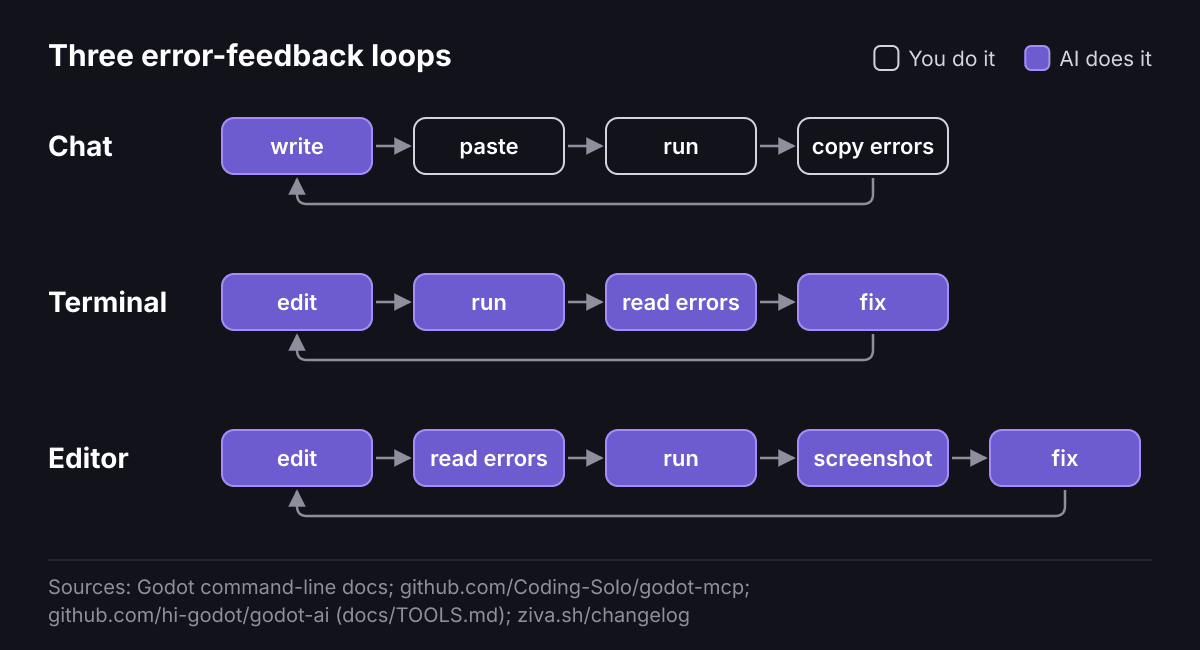 Chat users copy errors back. Terminal agents such as Claude Code can run Godot, read errors and fix code; Ziva, which we make, does this inside the editor. MCP tools also give terminal agents screenshots; either agent can receive them through a person or script.
- Write your engine version in AGENTS.md or CLAUDE.md , the files that give an agent project instructions. Prohibit Godot 3 APIs. Ziva reads AGENTS.md too.
- Add GDScript types. For new or fully typed code, enable Advanced Settings and set both unsafe-access warnings to Error under Project Settings > Debug > GDScript. Existing projects may produce many errors.
- For autoload-free scripts, Claude Code hooks , automatic shell commands, can run the check after edits. For scripts referencing autoloads, run the game and read debugger output.
- Let the agent run the game and read output with a tool below.
- For spatial problems, paste a screenshot into the agent or use a screenshot tool below. For collisions, enable Debug > Visible Collision Shapes for editor-launched runs. CLI runs need
--debug-collisions, per the command-line tutorial above.
These tool capabilities come from documentation; our test covered the parse check.
Free Coding-Solo/godot-mcp launches the editor, runs projects and captures debug output. Free hi-godot/godot-ai (Godot 4.7+) offers runs, errors, tests and screenshots (tool list ). Both need an agent, which may cost extra. GDAI MCP reads errors, edits scripts, runs the game and checks output with screenshots for $19 one-time.
Ziva’s in-editor agent receives errors with source files and lines (Ziva 3.1.2). Tool results include script errors from edits (Ziva 3.2.5). Turn-by-turn playtesting launches scenes, sends input and takes screenshots (Ziva 3.0.0). This core feature is separate from the Pro Playtest Agent.
Where AI costs you time
METR, an AI research group running controlled trials, studied 16 experienced developers in 2025 on familiar open-source repositories using early-2025 tools. It found: “When developers are allowed to use AI tools, they take 19% longer to complete issues”. Participants still believed AI sped them up by 20%.
METR’s February 2026 update says developers are likely faster now, but its data is very weak evidence for the size of the improvement. Many developers skipped the study, and 30% to 50% withheld tasks they did not want to do without AI. METR says these effects likely understate the speedup.
The 2023 Copilot trial found its AI-assisted group finished a JavaScript HTTP server task 55.8% faster. That was one small new task. METR studied issues in large codebases developers already knew.
AI invents functions and explains their use, reports Godot Forum user dragonforge-dev . Hacker News commenter andreagrandi , new to game development, reported Claude Code could not make a usable, good-looking Godot RPG area. The agent offered a functional but ugly layout.
Costs, limits and publishing rules
Our July 2026 Flappy Bird benchmark, using Ziva in-editor, billed $0.17 for GPT-5.6 Luna (2.4 minutes) and $1.59 for GPT-5.6 Sol (6.6 minutes). Each ran once at low reasoning effort, a model setting. These are actual model-usage charges.
Sol at xhigh reasoning effort billed $11.69 for its runs plus retries after three transient gateway connection drops. Start with low effort: Sol’s low-effort re-run ($1.59) earned the same 10/10 score as its xhigh run.
Our July 25, 2026 vampire-survivor benchmark used Ziva with one high-reasoning prompt per model. We connected our own Claude or Codex subscriptions. These are API-price estimates, not Ziva bills.
Claude Opus 5 ($65.64, 56 minutes) felt like a game; Sol ($9.79, 28 minutes) was playable but rough. GPT-5.6 Terra ($2.27, 11 minutes) was unplayable.
Our post recommends cheaper, faster Sol over Opus 5 if you stay involved.
Copilot Free includes 2,000 completions monthly. Claude Pro includes Claude Code at $20 billed monthly.
Ziva Hobby supports your own Claude Code or Codex account, with requests counted against that provider’s usage. It also supports local models through Ollama and LM Studio. Setup: https://ziva.sh/docs/existing-subscriptions and https://ziva.sh/docs/local-providers .
For hosted-model allowances and Playtest Agent access, check the current offer in your account and https://ziva.sh/#pricing .
Ziva is a docked chat agent with no inline completion. It needs Godot 4.2+. For hand-written GDScript, choose Copilot completions in a Godot-connected external editor .
The Godot Foundation’s policy announced June 30, 2026 governs engine contributions, not your game. Its contribution rules require human-authored code and prohibit agent-submitted PRs. Steam’s AI disclosure concerns AI-made content shipped to players. Coding assistance is not its focus.
Related reading
- How do I generate GDScript with AI?: explains chat, external editors, in-editor agents and syntax traps.
- Choose a tool once you know the workflow: https://ziva.sh/blogs/best-ai-tools-for-godot-game-engine .
- Vibe Coding Games: examines why one-prompt games break.
- Generative AI in Game Development: covers the GDC survey findings.